Copilot Long Responses: Copilot on Opus now uses its full 128K output limit, so large Node creation no longer gets cut off mid-response.
Copilot Tool Cards: Tool cards resolve when a response ends instead of spinning forever, and truncated responses are called out in chat.
Copilot Conversation Recovery: A failed tool call no longer breaks the rest of the conversation, and a failed Node creation cleans up after itself instead of leaving an empty Node behind.
Databricks OAuth on Azure: OAuth M2M connections to commercial Azure Databricks workspaces authenticate correctly. (Shipped in 7.39.3.)
Source Node Mapping Column Sort and Filter: On Source Nodes, you can sort Mapping tab columns alphabetically or by data type, and filter by column name. This makes wide Source tables easier to navigate.
Column-Level Node Type Config Items: V2 Node Types can add toggles, dropdowns, text boxes, and tables as per-column options, not only node-wide settings. Each column keeps its own value in SQL annotations and Node metadata.
Circular Dependency Problem Scanner: The problem scanner warns when your graph has a circular dependency, so you can catch cycles before plan or run surfaces a cycle-detected error.
BigQuery Local COA CLI: The local `coa` CLI supports BigQuery Service Account profiles for doctor, init, validate, create, and run paths that were previously Snowflake-only.
Node Type Name on Node API: Node API responses include `nodeTypeName` so callers get a friendly Node Type display name for custom and package types without changing the existing `nodeType` field.
View Plan for Deploy Runs: Anyone authorized to view a deploy run can open View Plan for that run's executed plan. Plan access is no longer limited to the user who created the plan.
Packages
Snowflake
Create or Alter package 1.6.3: Removes the Treat NULL as Current Timestamp toggle from Create or Alter Dimension, Fact, and Persistent Nodes. When Last Modified is enabled, a validation stage stops execution if NULL values exist in the selected timestamp column.
Cortex 4.2.0: Renames AI_EXTRACT to Cortex File Processor, adds `AI_PARSE_DOCUMENT` and `AI_TRANSCRIBE` support on Cortex File Processor, and migrates legacy `SNOWFLAKE.CORTEX` functions to AISQL `AI_*` functions on the LLM Node.
Bug Fixes
Column-Valued Annotation Serialization: Column selectors in V2 annotations such as `@orderbycolumn` and `@lastModifiedColumn` write the column name instead of `[object Object]`, so committed SQL and redeploy comparisons stay correct.
Hidden Config Options When Parent Toggle Is Off: When a parent config toggle is off, dependent config options are hidden and their annotations are stripped from the SQL Editor so you only see settings that apply.
Add a Column With Sorted Grid: After you sort the column grid, Add a Column focuses the newly created column instead of the last sorted row.
Subgraph Double-Click in Scrollable List: Double-clicking a subgraph in a scrollable Subgraphs list opens the subgraph you selected, including when the Node column panel is open.
Corrupt Metadata Errors in Column Editor: When corrupt column metadata blocks a transform save, the Column Editor shows an error instead of failing silently with no feedback.
Run Preview Hotkey During In-Flight Runs: Pressing Ctrl+Enter or Cmd+Enter while a Node run is already in progress no longer throws an unhandled "Nodes are already running" error.
Bulk Source Column Remap With Missing Columns: Bulk remap source columns returns a clear error when the source step has no columns, instead of crashing.
Snowflake View GROUP BY ALL Toggle: We removed the Group By All toggle from Snowflake View Nodes. You can still write GROUP BY ALL directly in your SQL.
V2 SQL Syntax Highlighting: The V2 Node editor highlights SQL keywords, types, functions, comments, Coalesce annotations, and Jinja template delimiters so SQL is easier to read while you edit.
Copilot Graph Search and Explore: Copilot can search your Workspace graph by Node name, fully qualified name, or description, and can run a read-only Explore subagent that investigates with read-only tools and returns a short digest in chat.
Copilot Opus Model Option: Copilot now has Fast and Smart effort modes, adaptive thinking, and read-only-by-default steering for mutations.
Snowflake View GROUP BY ALL: Snowflake View Nodes include a GROUP BY ALL configuration toggle. The toggle is mutually exclusive with Select Distinct.
COA Dry-Run Preview Status: `coa run --dry-run` distinguishes Nodes with no DML to preview (streams, dynamic tables, and views) from real failures, so managed objects no longer appear as red errors when the pipeline is healthy.
Run Details Step Duration: Run details show step durations in seconds, minutes, or hours instead of raw milliseconds, and sorting by duration still works.
Snowflake Comments During Plan: During plan, Coalesce can load existing Snowflake table and column comments from the warehouse. This supports externally managed descriptions without changing how you edit descriptions in the UI.
Business Key and Change Tracking Git Sync: Editing Business Keys or Change Tracking after the initial commit now updates the generated SQL so Git tracks the change and redeploy carries the new configuration to other Environments.
Copilot Storage Location Instructions: Copilot honors explicit storage location requests instead of substituting the dominant Workspace pattern, and rejects unknown`ref()` locations with a clear suggestion when possible.
Node Right-Click Menu Visibility: The graph Node context menu keeps a consistent width and shows all options, including Delete Node, without scrolling when the Node is selected.
SQL Parse Errors at Plan Time: When active SQL fails to parse, plan and deploy surface the parse error instead of compiling stale Node metadata.
Account URL Paste Handling: Pasting a full Snowflake account URL into Workspace or Environment Account URL fields strips the`https://` prefix and`.snowflakecomputing.com` suffix as you paste or type, so the saved value is only the account identifier.
Create Branch with Duplicate Column IDs: Creating a new branch from a commit that contains duplicate column IDs no longer partially checks out the branch.
Copilot Preferred Node Type Version: You can set a V1 or V2 Node Type preference in AI org and project settings. The default is V1. When you choose V2, Copilot prompt context updates so it reasons about and generates the correct Node Type.
External Node and Column Descriptions: Organizations can configure table and column descriptions to be managed outside Transform. The description field can’t be edited with this setting enabled.
Deploy Plan Details Layout: Deploy plan details open in a larger drawer so you have more room to review changes.
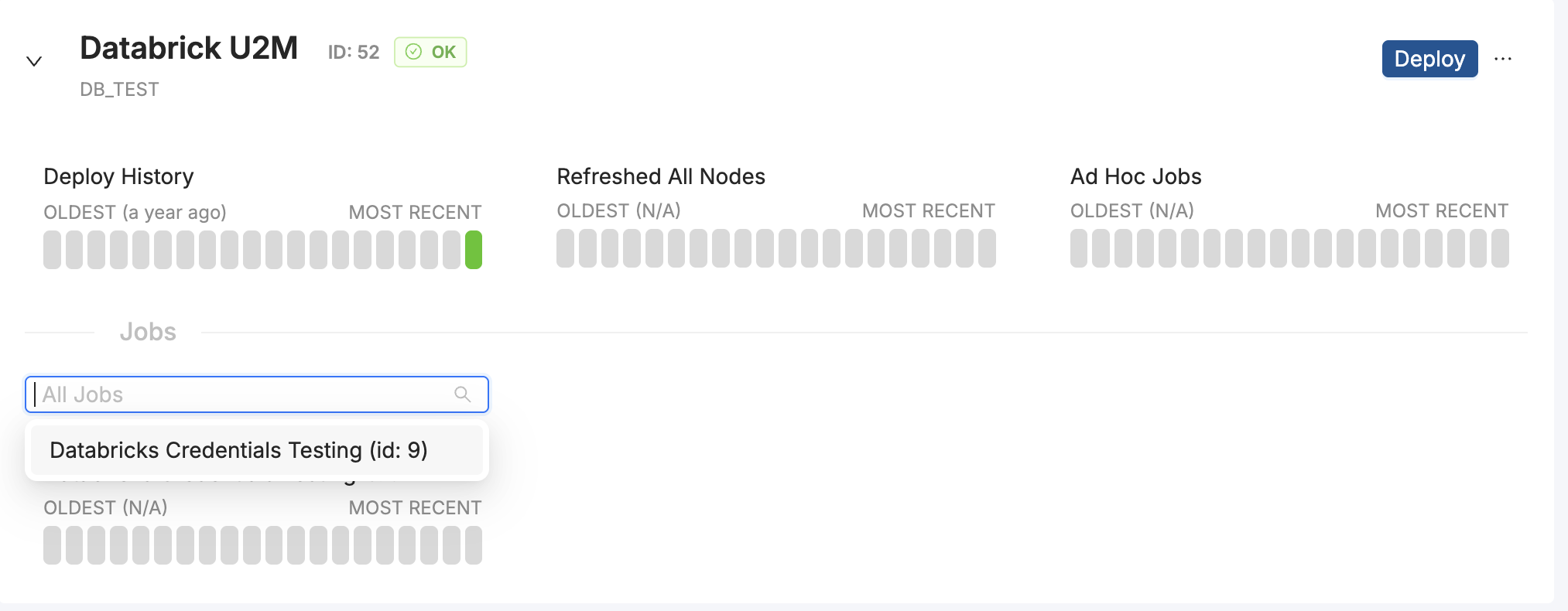
Deploy Dashboard Job Filter: You can search and multi-select Jobs on environment cards in the Deploy dashboard. Job names are listed alphabetically with their IDs, and deep-linked Jobs stay visible.
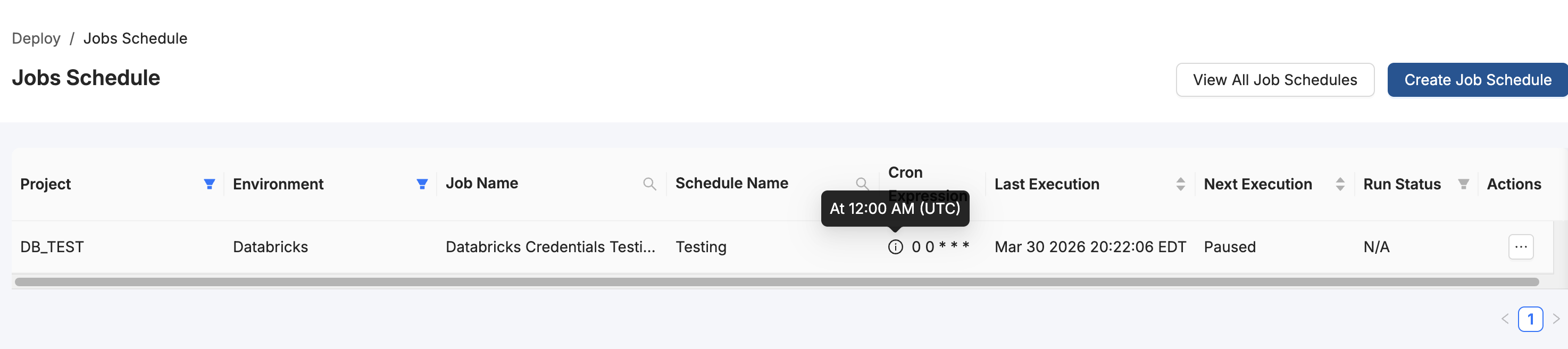
Scheduled Jobs Cron Expression: The Scheduled Jobs table includes a Cron Expression column between Schedule Name and Last Execution. Hover the info icon to see a human-readable schedule description.
Packages
Snowflake
Streams and Tasks 2.7.2: Adds a Task Time Out option for all task-related Node Types, including Dimension with Task, Fact with Task, Work with Task, Stream and Insert or Merge, Task DAG Create Root, Delta Stream Merge, and Insert or Merge with Task.
Streams and Tasks 2.7.0 : Adds the Task DAG Custom-SQL Node Type for executing custom SQL within Task DAGs. Includes Task DAG Resume Root case-retention and trimming improvements.
Base Node Types Advanced Deploy 2.5.7: Resolves a minor issue in the Dimension Advanced Deploy Node Type discovered during validation of related bug fixes.
Bug Fixes
Git Input Fields During Loading: Git modal input fields are disabled while commit, push, or force checkout actions are in progress, preventing edits during loading.
Databricks Intermittent HTTP 400 Errors: Fixed intermittent HTTP 400 responses when creating or running Nodes against Databricks with token authentication (Cloud or Browser).
Missing Database or Schema During Plan: Planning no longer blocks when a Node's database or schema no longer exists during managed-access checks. Missing or invalid locations surface as deploy warnings.
Deploy Dashboard Cross-Environment Jobs: Jobs no longer incorrectly show under other environment cards when you expand multiple platform environments on the Deploy dashboard.
Results Pane Sort Order: Fixed inconsistent ordering in the Workspace results pane where the latest result could appear at the bottom instead of the top.
V2 SQL Comment and UNPIVOT Parsing: The V2 SQL parser now respects line and block comments and parses UNPIVOT. Commented-out SQL no longer compiles into DDL or DML.
Node Run Double-Click: Fixed an issue where rapidly double-clicking Run in the Node menu could throw a "Nodes are already running" error.
Node Type Editor Monaco Error: Fixed a "undefined" is not valid JSON error in the Monaco editor when editing Node Type templates.
We've added Google as a Single Sign-On (SSO) provider. You can now log into Coalesce using Google Cloud or Google Workspace credentials Learn how to set up in Google SSO.
Updates
Copilot Create and Update V2 Nodes: When the SQL editor is enabled for your org, Copilot can now create and update V2 Node Types. Copilot writes V2 Nodes in raw SQL and automatically prevents mixing V1 and V2 Node Types.
Copilot Column Datatype and Nullability: Copilot can now change a column's datatype, precision, and nullability.
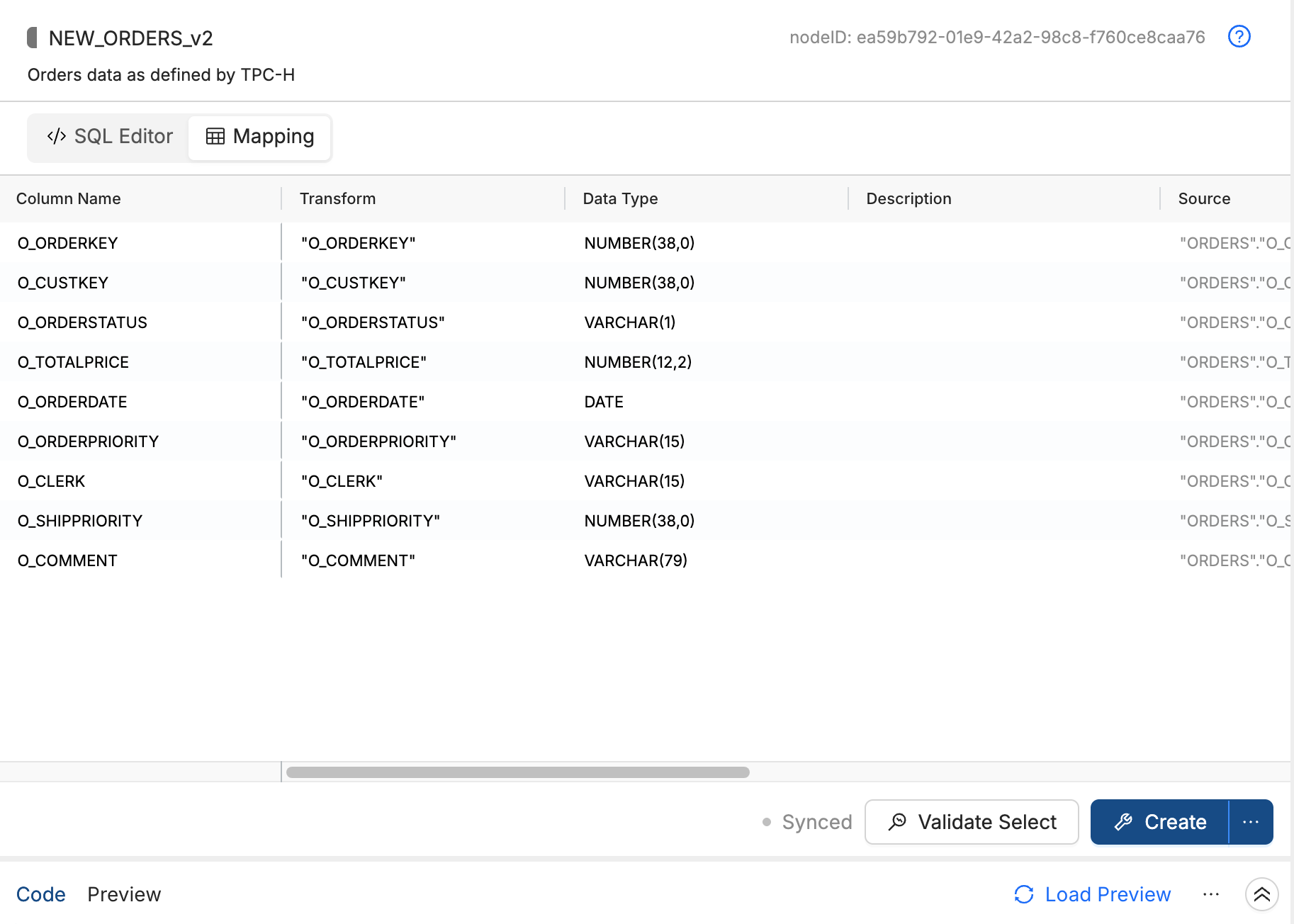
V2 Node Mapping Grid View: V2 Nodes now include a read-only mapping grid, accessible from the SQL editor. As you write SQL, the grid displays each column's transform, data type, source, nullability, description, and related fields.
Packages
Snowflake
Semantic View 1.0.1: Adds support for AI_SQL_GENERATION and AI_QUESTION_CATEGORIZATION on the Semantic View Node Type.
Dynamic Tables 2.1.8: Fixes Validate Select failures caused by the template rendering error 'ns' is undefined.
Base Node Types Advanced Deploy 2.5.5: Adds incremental loading and soft delete handling for Fact Advanced Deploy and Factless Fact Advanced Deploy Nodes.
Bug Fixes
Multi Source setNode Source Mapping: Fixed a bug where column sources and transforms were lost from all but the first source when using the setNode API on a Multi Source Node with a transformed column.
Force Checkout Data Loss Warning: Force checkout now correctly shows a data-loss warning when your version control repository format is stale, preventing accidental loss of uncommitted Workspace changes.
Azure DevOps Personal Access Token Expiration Error: When an Azure DevOps personal access token expires, you'll now see a clear error message with a direct link to the version control setup documentation.
AI Version Control Commit Message Size Limit: If a diff is too large for the AI commit message generator to process, you'll now see a specific error message instead of a generic 500 error.
Table truncation not applied before insert (V2 SQL Node) - V2 SQL Nodes with the`@truncateBefore` annotation were silently ignoring it, causing rows to be appended on every run instead of replacing the table's contents. This is now fixed and `@truncateBefore` works as expected.
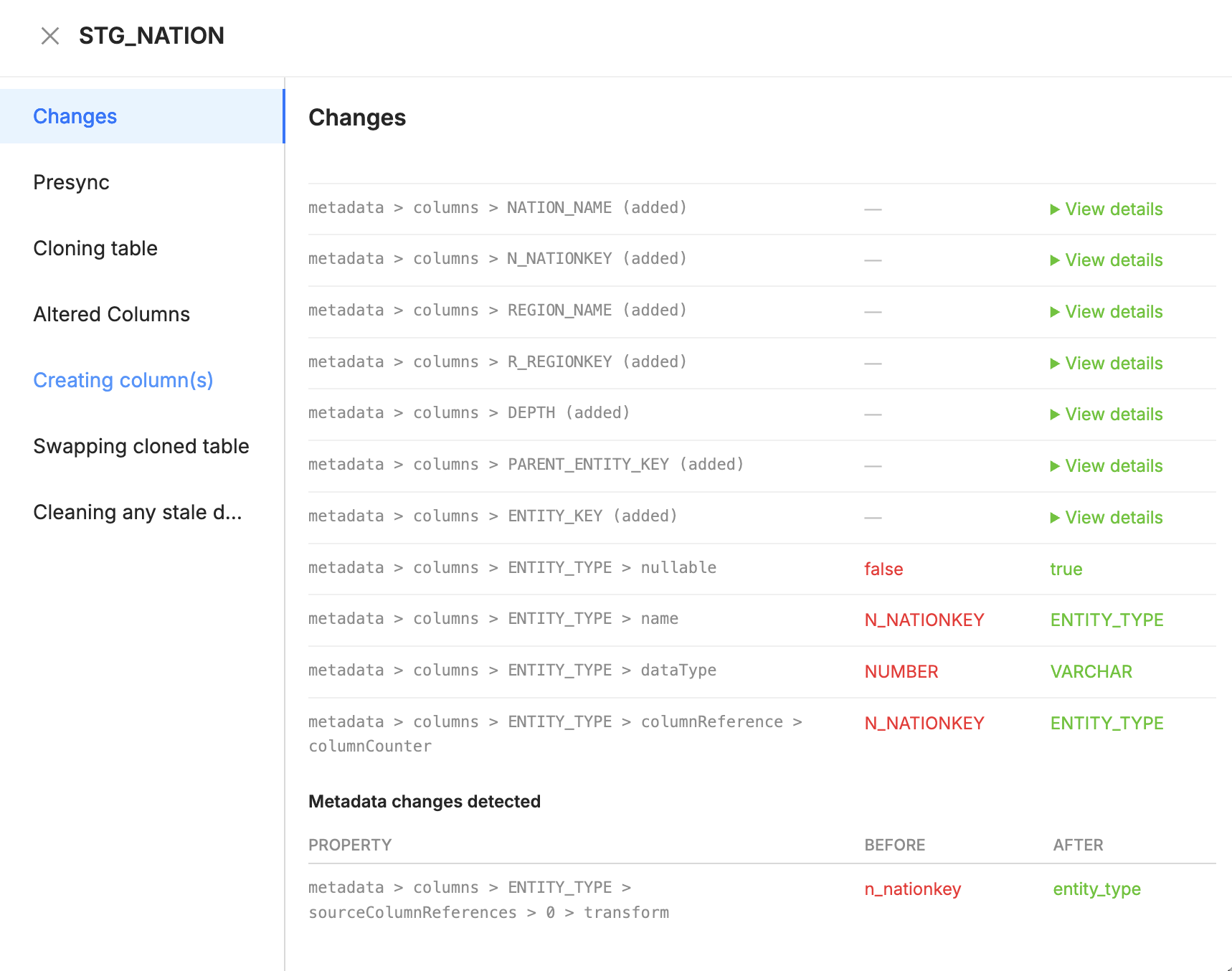
Metadata Differences in Plan: When you generate a plan, the Deploy wizard includes a Changes tab on each altered Node. The tab shows property-level before and after values for DDL, metadata, source mapping, and other changes.
COA CLI and API Environment Management: coa environments update is available in the COA CLI and the API. It supports creating, updating, and deleting deployment environments.
Environment List Project Filter COA CLI and API adds a project filter for environments. coa environments list --project or ?project=.
Packages
Snowflake
Base Node Types 1.6.2: Removes the Treat NULL as Current Timestamp toggle from Persistent Stage, Dimension, and Fact Nodes, and includes Persistent Stage bug fixes.
Base Node Types - SQL 1.0.0 : Initial release with INSERT and MERGE support for SQL-first V2 Node authoring in Coalesce.
Base Node Types Advanced Deploy 2.5.4: Same Treat NULL as Current Timestamp toggle removal as Base Node Types 1.6.2, plus a validation stage when Last Modified is enabled that stops execution if NULL values exist in the selected timestamp column, and includes Persistent Stage Advanced Deploy bug fixes.
Cortex 4.1.0: Adds task enhancements to the AI EXTRACT Node Type: notifications, execute-as user, suspend after failures, auto-retry, overlapping execution, and expanded schedule units, and adds Node Type Switch support to CSS and AI EXTRACT Node Types.
Iceberg Tables 3.3.0: Adds the External Iceberg REST Table Node Type and fixes Iceberg Dynamic Tables validate-select behavior.
Duplicate Column IDs on Git Pull: Coalesce blocks checkout when a commit introduces duplicate or empty column IDs in a Node.
COA Init Refresh Token Guidance: coa init now points you to the Deploy tab for refresh tokens instead of the Build tab.
Column Name Editor Console Errors: Editing column names in the Node grid no longer routes non-SQL fields through the SQL web worker, which removes spurious JSON.parse errors in the browser console.
COA Validate False Missing-Column References: Fixed an issue where coa validate reported missing column references on V2 SQL Nodes that select from V1 YAML sources when the column UUID counters were valid.
V2 SQL Deploy with Package Node Types: When you plan or deploy V2 SQL Nodes that use a Node Type from an installed Package, Coalesce now generates tables with the correct columns. Previously, deploy could produce empty table definitions that your warehouse rejected.