Product Updates

Version 7.45.1

by Coalesce
Updates
Bug Fix
Preview
Packages

Updates

  • Desktop Linux Preview: The Coalesce desktop application is now packaged for Linux distributions with AppImage and native Debian/Ubuntu (.deb) packages, including auto-updates.

  • Virtual Tree in Source Browser: The Add Source modal now uses a high-performance virtual tree, smoothly scrolling through storage mappings with tens of thousands of objects.

  • Marketplace Packages Discovery: Added coa packages list to inspect available marketplace packages and their latest public versions from the CLI.

Bug Fixes

  • Snowflake Encrypted Keys in Desktop: Fixed an issue where password-encrypted private keys failed to decrypt in the desktop application runtime.

  • SQL Parser Error Handling: Prevented repeating crash loops in the Builder when editing complex statements containing unresolved SQL expressions.

Packages

Snowflake

  • Base Node Types - SQL 2.1.0: Adds a SQL-first Dimension node type that builds SCD Type 1 or Type 2 dimensions with upsert, changeTracking, or lastModified merge strategies and built-in data quality tests. Also includes 2.0.1, where accepted and rejected values tests accept lists, and 2.0.0, which added a Work node type that declares its annotations in its spec.

  • Base Node Types - SQL Advanced 1.0.0: New package. Adds a Work Advanced Deploy node type for SQL Nodes that can alter, recreate, or drop tables, transient tables, and views on redeploy.

  • Streams and Tasks 2.8.1: Restores the Task DAG Custom-SQL node type. Also includes 2.8.0, which updated stage labels and added primary key support.

  • Dynamic Tables 2.1.9: Fixes deploys that add column comments or make several changes to a dynamic table at once.

BigQuery

Databricks

Action required: Confirm your IP allow-list for Coalesce (US region)

by Mike McCune
New
Action Required

North American Transform Customers,

We successfully completed our scheduled outage this morning but some of our customers are experiencing job execution failures due to changes we made during the outage.

During the scheduled maintenance we took a series of steps to increase the scale of our cloud infrastructure, which is now fully utilizing all of our documented outbound network range for our Google Cloud us-central1 region. If you have a Data Platform network policy defined, please confirm and update your IP address allowed list to include the full set documented here under the “US | Google | us-central1 | Iowa” section:

https://docs.coalesce.io/docs/setup-your-project/setup-requirements/network-requirements

Ensure you have the full list configured, not only the addresses that are new to you. Coalesce may connect from any address in this range, and which one it uses on a given connection is not fixed. Allow-listing a subset can appear to work and then fail later.

We apologize for the disruption. Please reach out to our Support Team with any questions.

Updated Schedule: Planned Maintenance: Coalesce Transform, Saturday, July 25, 2026

by Mike McCune, VP of Engineering
New

Hi everyone,

We're writing to share updated details and the hourly schedule for the Transform planned maintenance on
Saturday, July 25, 2026.

This maintenance affects Coalesce Transform only. Catalog and Quality will remain operational. The only Catalog or Quality impact is for customers who have them integrated with Transform, who will not be able to synchronize data from Transform during the outage.

Regional targets (each region is offline for about 1 hour)

Region

Window (Eastern)

Window (UTC)

APAC

1:00–2:00 AM ET

05:00–06:00 UTC

EMEA

2:00–3:00 AM ET

06:00–07:00 UTC

Canada

3:00–4:00 AM ET

07:00–08:00 UTC

North America

4:00–5:00 AM ET

08:00–09:00 UTC

Why we're doing this

We're migrating the Transform database to a new compute cluster. This is foundational work that requires the Transform application to be fully offline while it runs. This is a rare event and is the first planned outage in Coalesce's history, and we don't intend to repeat.

What the maintenance affects

During each regional window, the
Transform application will be completely offline. While it's offline:

  • You won't be able to log in or use Transform.

  • Scheduled and API-triggered job runs will not run.

  • CLI-triggered deployments will not run.

  • Transform's integrations with Catalog and Quality will be offline.


We deliberately moved this into the early-morning Eastern window and split it by region so that ideally, no customer is down for more than about an hour, and we adhere to our SLA. There's no perfect time for a global platform, but this is our lowest-traffic period.

We appreciate the patience,
Mike McCune
VP of Engineering -
Coalesce.io

Planned Maintenance Notice: Scheduled Outage on Saturday, July 24, 2026

by Coalesce
Announcement

Please see Correction to: Planned Maintenance Notice: Scheduled Outage on Saturday, July 26, 2026

Coalesce Customers,

We’re writing to let you know about a planned maintenance window on Saturday, July 26, from 8:00 AM to 4:00 PM Pacific Time.

During this window, the application will be fully offline and unavailable while we perform infrastructure re-deployment work to improve platform consistency and reliability.

We expect the work to take less than 4 hours, but we are reserving the full maintenance window until 4:00 PM Pacific in case unexpected circumstances arise.

What to expect

  • The application will be unavailable for the duration of the maintenance window

  • Users will not be able to access the platform during this time

  • Service will be restored as soon as the work is complete

We recommend planning work accordingly to avoid disruption and subscribing to updates on our Status Page:

We’ll share a follow-up notice once maintenance has been completed and the application is back online.

If you have any questions or concerns, please reach out to our Support Team. Thank you for your patience and understanding.

Mike McCune

VP of Engineering, Coalesce.io

Version 7.37

by Coalesce
New
Updates
Bug Fix

Google SSO

We've added Google as a Single Sign-On (SSO) provider. You can now log into Coalesce using Google Cloud or Google Workspace credentials Learn how to set up in Google SSO.

Updates

Copilot Create and Update V2 Nodes: When the SQL editor is enabled for your org, Copilot can now create and update V2 Node Types. Copilot writes V2 Nodes in raw SQL and automatically prevents mixing V1 and V2 Node Types.

Copilot Column Datatype and Nullability: Copilot can now change a column's datatype, precision, and nullability.

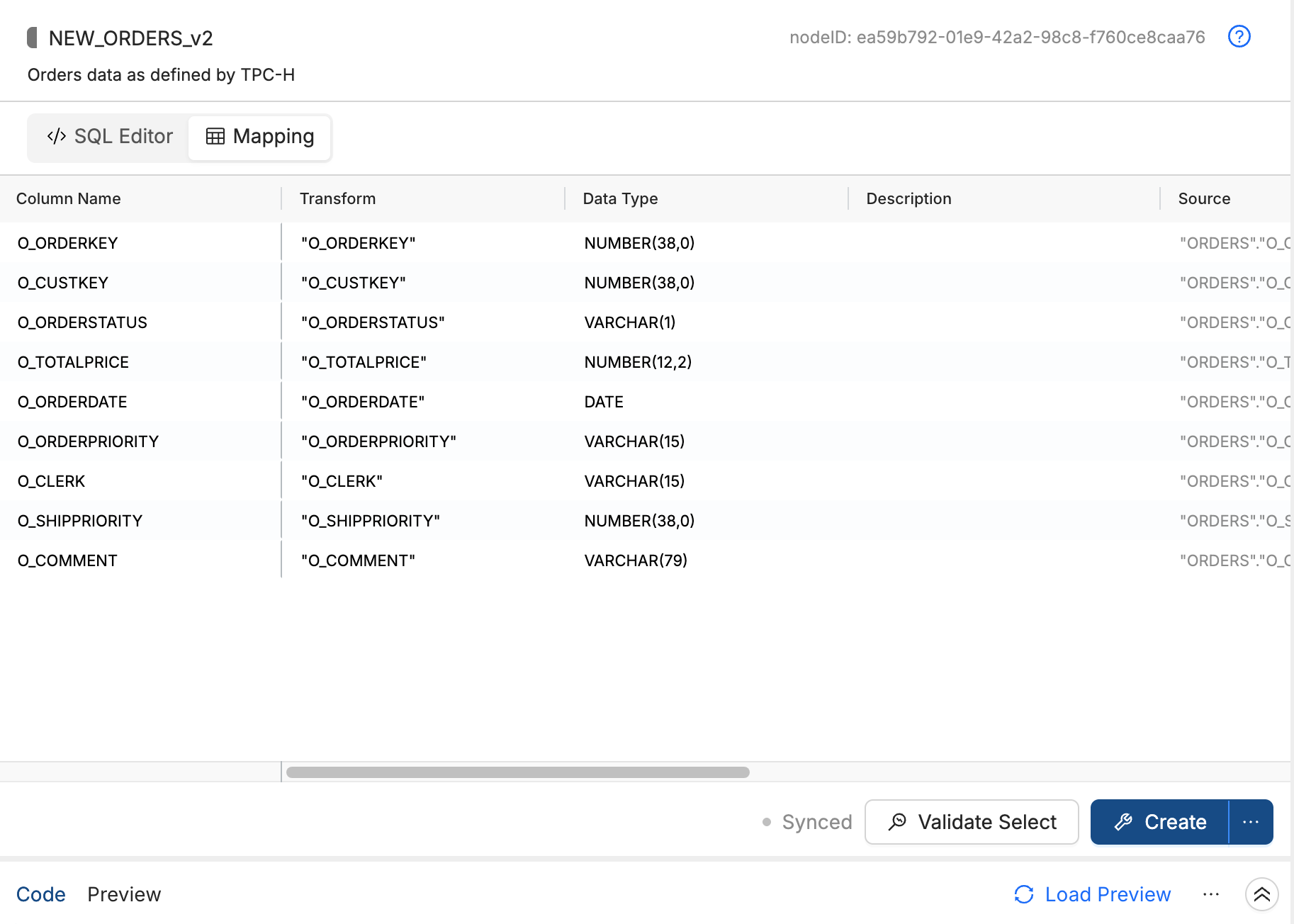
V2 Node Mapping Grid View: V2 Nodes now include a read-only mapping grid, accessible from the SQL editor. As you write SQL, the grid displays each column's transform, data type, source, nullability, description, and related fields.

Packages

Snowflake

Semantic View 1.0.1: Adds support for AI_SQL_GENERATION and AI_QUESTION_CATEGORIZATION on the Semantic View Node Type.

Dynamic Tables 2.1.8: Fixes Validate Select failures caused by the template rendering error 'ns' is undefined.

Base Node Types Advanced Deploy 2.5.5: Adds incremental loading and soft delete handling for Fact Advanced Deploy and Factless Fact Advanced Deploy Nodes.

Bug Fixes

Multi Source setNode Source Mapping: Fixed a bug where column sources and transforms were lost from all but the first source when using the setNode API on a Multi Source Node with a transformed column.

Force Checkout Data Loss Warning: Force checkout now correctly shows a data-loss warning when your version control repository format is stale, preventing accidental loss of uncommitted Workspace changes.

Azure DevOps Personal Access Token Expiration Error: When an Azure DevOps personal access token expires, you'll now see a clear error message with a direct link to the version control setup documentation.

AI Version Control Commit Message Size Limit: If a diff is too large for the AI commit message generator to process, you'll now see a specific error message instead of a generic 500 error.

V2 Node Is Available

by Coalesce
New

Node Type V2 is available again in Coalesce.

Write a standard`SELECT` statement in the editor and Coalesce infers columns, data types, and upstream dependencies. Because V2 use SQL, use it with your AI agent to quickly create and convert Nodes. V2 nodes work alongside V1 nodes in the same workspace.

View the full documentation

Version 7.33

by Coalesce
New
Updates
Bug Fix

V2 Node Types: SQL-First Authoring

You can now build transformations by writing SQL directly in Coalesce. Node Type V2 lets you paste existing queries, author CTE-heavy logic, or drop in AI-generated SQL and get everything Coalesce offers in return: automatic column extraction, full DAG and column-level lineage, template-driven deployment, and governance. Configuration moves into the file itself via inline annotations like @insertStrategy("MERGE") or @isBusinessKey, keeping your transformation and its metadata in one place. V2 nodes work alongside your existing V1 nodes in the same pipeline, so you can migrate at your own pace, one node type at a time.

Learn more about V2 Node Types.

COA CLI: Local-First Pipeline Development

You can now build and run Coalesce pipelines entirely from your terminal. The COA CLI brings local-first development to Coalesce, letting you author .sql transformation nodes in your editor of choice, run them directly against your warehouse, and deploy to your environment without touching the UI. Install it via npm, point it at your warehouse credentials, and you have the full pipeline workflow at your fingertips: coa create generates your DDL, coa run populates your tables, and coa plan and coa deploy push changes to your Coalesce environment. COA works with your existing Git workflow and supports the same V2 SQL nodes, node types, and ref() dependency graph you already know. Whether you prefer coding locally, integrating with CI/CD, or just want faster iteration cycles, the COA CLI is how you bring that workflow to Coalesce.

Get coa version 7.33.
Read the documentation.

Updates

  • Copilot Downstream Column Descriptions: Copilot now carries column descriptions into downstream columns it creates.

Packages

BigQuery

BigQuery Base Node Types 1.1.0: Added a Last Modified Comparison option to MERGE logic for Persistent Stage, Dimension, and Fact Nodes; UUID visibility moved into the Node definition for column visibility; package tags for marketplace visibility; documentation updates including a config matrix.

Databricks

Databricks Base Node Types 1.1.0: Zero-key Dimension support, a last-modified toggle on Dimension, Persistent Stage, and Fact, soft delete and hard delete on Dimension, documentation updates, and an updated get_clause() macro.

Snowflake

  • Streams and Tasks 2.6.1: Replaces ALLOW_OVERLAPPING_EXECUTION with OVERLAP_POLICY, small UI fixes, and Git documentation updates with impact analysis for task-enabled Node types.

  • Iceberg Tables 3.2.1: Error and success notification integrations, execute as user, suspend after failures, task auto-retry, overlapping task runs, expanded task configuration and schedule fields, serverless warehouse size limits for tasks, and related documentation for Iceberg external tables.

  • Functional Node Types 4.3.2: Node Type switch support and documentation updates.

  • Deferred Merge 2.0.3: Task notification integrations, execute as user, suspend after failures, auto-retry, overlapping runs, richer schedule and configuration fields, serverless task size bounds, and schedule unit expansion.

  • Create or Alter package 1.6.1: Same task-focused improvements as Deferred Merge 2.0.3 for supported Node types.

  • Cortex 4.0.0: Replaces deprecated !PREDICT with AI_EXTRACT, renames Document AI to AI EXTRACT, and updates configuration to match the new function.

Bug Fixes

  • Databricks Token Authentication: Databricks token authentication now shows clearer errors to help with troubleshooting.

  • setNode With Duplicate Table Names: setNode now resolves the correct table when two tables share a name but live in different storage locations.

  • Presync Errors: Presync deploy errors show clearer messaging to help with troubleshooting.

  • Workspace Wizard and Git Permissions: When Git credentials lack permission, the Workspace creation wizard keeps your entries and shows a specific error instead of a generic failure.

  • Re-sync Columns and Descriptions: Re-syncing columns now picks up description changes from your data platform so your Node metadata stays current.

  • Run Details Sorting: Sorting ascending or descending in run details works when some values are missing instead of mis-ordering rows.

Version 7.29.0

by Coalesce
Action Required
Updates
Bug Fix

BigQuery in Private Preview

Big Query support in Coalesce Transform is now available in private preview. Reach out to your account team to enable it.


UI Changes

  • Project and Workspace ID in URL — URLs now include the Project and Workspace ID, making it easy to share direct links to specific Workspaces. For example /projects/<project-id>/workspaces/<workspace-id>/build

  • Redesigned Copilot Chat History — The Copilot chat history now uses a card-style design with improved hover states. History items show "X messages · Xh ago" instead of full timestamps, and the delete button only appears on hover for a cleaner look.

Copilot

  • Message Feedback — You can now provide feedback on specific Copilot messages using like and dislike buttons, helping improve AI response quality.

  • Improved Abort Functionality — The Copilot abort button now properly stops the UI spinner when you cancel a request. Previously, the spinner continued even after aborting.

Packages

BigQuery

Bug Fixes

  • Preserved Thread Titles — Fixed an issue where Copilot thread titles were overwritten when starting a new chat. Existing thread titles are now preserved correctly.

  • Runtime Parameter Warning Consistency — Fixed an issue in the Node Type Editor where after correcting invalid runtime parameters and saving, the error popup wouldn't automatically clear until you left and re-entered the editor. The warning now updates correctly when parameters are fixed.

  • Copilot Text Overflow — Fixed an issue where text content in Copilot responses overflowed horizontally beyond the shaded content area. Content now displays within proper boundaries.

  • Subgraph Tab Handling — Fixed an issue where deleting a Subgraph while its tab was active resulted in a blank white tab. The interface now handles Subgraph deletion gracefully.

  • Code Editor Line Numbers — Fixed a CSS conflict where duplicate line numbers would appear.